The GPWS takes additional data from the stall warning computer (STC) and determines if windshear conditions are occurring in the immediate vicinity of the airplane.
In addition, the GPWS computer takes weather radar data and determines if windshear conditions are occurring ahead of the airplane track.
GPWS issues Windshear Immediate-Warnings whenever decreasing-performance windshear conditions are present during takeoff, approach and landing.
If illuminated, pushing a Master WARNING/CAUTION reset switch resets the Master WARNING lights but does not deactivate the windshear warning.
The weather radar provides predictive windshear (PWS) alerts when it detects disturbed air ahead of the aircraft which contains moisture or particulate matter and which fits a known pattern of windshear activity.
The PWS alert area ahead of the aircraft is shown as follows:
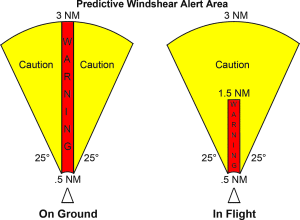
When the PWS mode is enabled, the radar system is time-shared between the weather display and the PWS display. During the time-share:
- the weather display is slower to update
- PWS alerts are available approximately 12 seconds after the system begins scanning
- PWS automatically, regardless of actual Weather Radar Control Panel settings, adjusts the antenna TILT and the system GAIN for optimum windshear detection
The PWS mode is automatically enabled when:
- on the ground, the thrust levers are set for takeoff
- in flight, the aircraft is below 2,300 feet AGL
PWS alerts are automatically enabled below 1,200 feet AGL.
PWS warnings are accompanied by:
- visual alerts (see tables)
- voice or aural alerts (see tables)
If illuminated, pushing a Master WARNING/CAUTION reset switch resets the Master WARNING lights but does not deactivate the windshear warning.
PWS caution alerts are accompanied by:
- visual alerts (see tables)
- voice or aural alerts (see tables)
Note: PWS does not provide alerting for all types of windshear. The flight crew must continue to rely on traditional windshear avoidance methods.
| Aural Alert |
Visual Alert |
Description |
WINDSHEAR AHEAD,
WINDSHEAR AHEAD |
Red WINDSHEAR on both ADIs
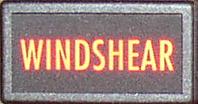
Master WARNING lights
RED and BLACK PWS symbol on HSI
Red WINDSHEAR message on HSI (all modes)
|
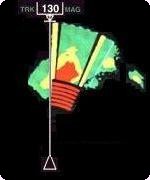
Enabled during takeoff, below 1,200 feet AGL (Radio Altitude).
Windshear within 3.0 miles and directly ahead of the airplane .
PWS symbol on the HSI shows windshear position and size only when the HSI Mode Selector is in the VOR, APP, MAP or CTR MAP mode and the TERR switch is not pushed.
|
| GO AROUND, WINDSHEAR AHEAD
|
Red WINDSHEAR on both ADIs
Master WARNING lights
RED and BLACK PWS symbol on HSI
Red WINDSHEAR message on HSI (all modes)
|
Enabled during approach, below 1,200 feet AGL (Radio Altitude).
Windshear within 1.5 miles and directly ahead of the airplane .
PWS symbol on the HSI shows windshear position and size only when the HSI Mode Selector is in the VOR, APP, MAP or CTR MAP mode and the TERR switch is not pushed.
|
| Aural Alert |
Visual Alert |
Description |
MONITOR
RADAR
DISPLAY |
RED and BLACK PWS symbol on HSI
Amber WINDSHEAR message on HSI (all modes)
|
Windshear within 3 miles and not directly ahead of the airplane.
Enabled during takeoff and approach, below 1,200 feet AGL (Radio Altitude).
PWS symbol on the HSI shows windshear position and size only when the HSI Mode Selector is in the VOR, APP, MAP or CTR MAP mode and the TERR switch is not pushed.
|
PWS alerts are inhibited during takeoff and landing as follows:
- WARNINGS, between 100 knots and 50 feet AGL
- CAUTIONS, between 80 knots and 400 feet AGL
Note: These inhibits do not remove existing PWS alerts.
PWS alerts are also inhibited by