Departures
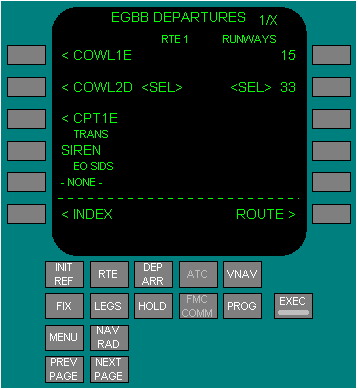
The departures page is used to select the departure runway, SID, and transition for the route origin airport.
The departures page for the inactive route displays when the DEP ARR function key is pushed with an inactive RTE or RTE LEGS page is displayed.
Selecting an option displays <SEL> inboard of the option and creates a route modification. After executing the modification, <SEL> becomes <ACT>. Executing a modification or leaving the page and returning displays all options and the <SEL> or <ACT> prompts.
SIDS - Displays a list of SIDS for the airport. Push:
TRANS - Displays transitions compatible with the selected SID. Push:
EO SIDS - EO SIDs are airline designed procedures for specific runways. When a runway is selected the EO SID is listed after the other SIDs associated with that runway. If no EO SID exists for the selected runway, NONE is displayed.
PUSH - on the ground, selects the EO SID as a route modification for review. The modification should be erased after the review is complete.
If an engine failure occurs after takeoff before the flaps are retracted, the EO SID will be automatically loaded as a route modification to be executed or erased.
PUSH - on the ground, selects the EO SID as a route modification for review. The modification should be erased after the review is complete.
If an engine failure occurs after takeoff before the flaps are retracted, the EO SID will be automatically loaded as a route modification to be executed or erased.
ERASE - Erase displays when a route modification is pending. INDEX displays when no route modification is pending. ERASE push - removes selections not executed and displays the entire departure page. Other vertical or lateral modifications will be erased also.
INDEX Displays the DEP/ARR INDEX page.
INDEX Displays the DEP/ARR INDEX page.
RUNWAYS - Displays a list of runways for the selected airport. The runway selected on the RTE 1/X page displays as <SEL> or <ACT>. Push:
RUNWAYS - Displays a list of runways for the selected airport. The runway selected on the RTE 1/X page displays as <SEL> or <ACT>. Push:
ROUTE - Displays the related RTE page.